There’s a lot of hype surrounding the upcoming release of Windows 10, Microsoft’s latest operating system, and for good reason: Windows 10 promises to forego the metro interface of Windows 8 in favor of bringing back a thoroughly overhauled desktop experience that introduces several new features you won’t find elsewhere.
Major upgrades to gaming, search, and productivity are available right out of the box, and Windows 10 also benefits from several performance gains that all users may take advantage of, regardless of what device they’re using. In addition to these features, a big focus for Windows 10 is usability and simplicity—something that Microsoft has made a top priority for its upcoming operating system to help woo Apple enthusiasts to its platform.
Here’s a list of five killer features that will get Mac users to switch to Windows 10.
Cortana

Judging from the technical previews and product demos that Microsoft has put out, Cortana is shaping up to be a better, more integrated version of Apple’s Siri. Not only will you be able to use Cortana’s voice search on both the Windows desktop and the browser, you’ll also be able to take the digital assistant with you on non-Windows devices thanks to Microsoft’s decision to release both Android and iOS apps for the service.
When used with Microsoft’s revamped browser, Microsoft Edge, Cortana allows users to quickly pull contextual information about highlighted topics without needing to navigate to another page. Similarly, it’ll pull up directions and contact information for objects of interest like restaurants and theaters. You’ll also save quite a bit of time with Cortana search results right in the navigation bar for simple queries about stocks and weather.
Microsoft Edge
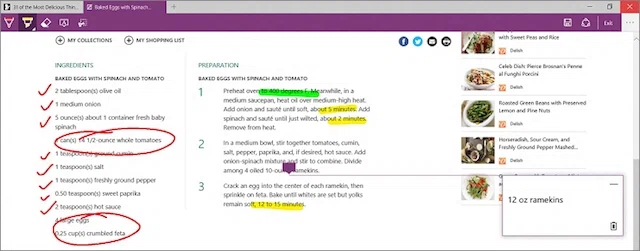
It’s not exactly a secret that Internet Explorer is one of the most, if not the most bashed web browser out there, which is why Microsoft has decided to axe the entire platform in favor of brand new browser called Microsoft Edge. Like Cortana, Microsoft Edge supports integrated apps that allow 1-click Skype calling as well as native extensions for popular websites like Reddit and Pinterest.
Built with compatibility in mind, Microsoft Edge supports extensions and plug-ins from competing browsers like Mozilla FireFox and Chrome, making switching over much less of a hassle for new users. Microsoft Edge also borrows from the clean and straightforward design of Google Chrome so you’ll get much less clutter (read: toolbars) than before. Other goodies include much faster page rendering, a reading mode that strips out ads and other superfluous content, and the ability to annotate web pages that you can share with your peers.
Xbox Integration and DirectX 12
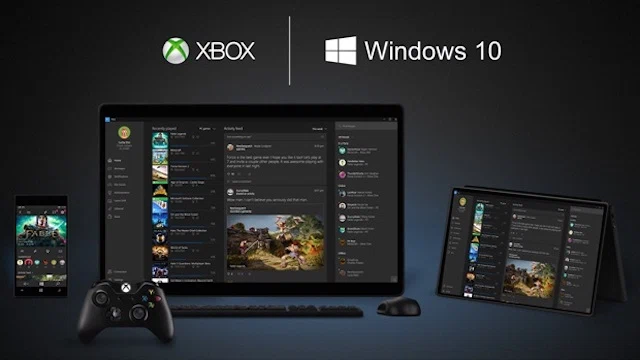
PCs have always been associated with gamers, and Windows 10 will be no exception. One of the biggest advantages for PC gamers will be the native inclusion of the DirectX 12 API, which will significantly improve video game performance over its seven-year-old predecessor, DirectX 12. While exact performance gains will depend on the system being used, testing has shown up to 20% performance gains for computers with a dedicated GPU while integrated notebook graphics saw a boost of up to 230%. That’s a lot of extra wallop for just changing your operating system.
Another big gaming foray for Windows 10 will be its integration of Xbox One into the operating system, unlocking an unprecedented level of functionality between the two devices. Gamers can stream their gameplay from their Xbox One to their non-gaming laptops, and because Windows 10 will have baked-in support for cross-device multiplayer, you’ll be able to play with your friends regardless of which device you’re using.
Universal Apps
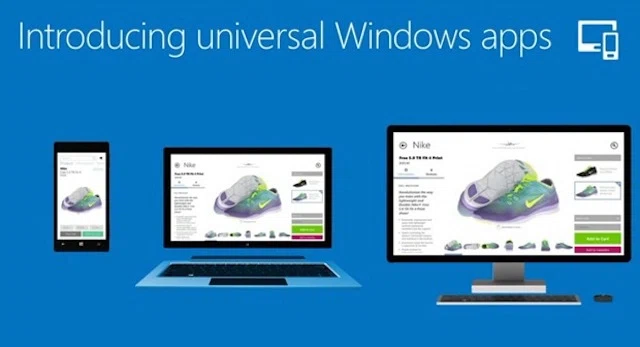
One of the most useful additions to the Windows 10 experience will be the inclusion of Windows apps, which are mobile versions of Microsoft’s desktop software for tablets and phones that are 8 inches or smaller. This means having on-the-go access to useful productivity software like Word, PowerPoint and Outlook, which are all optimized for mobile devices that have a touch interface.
You’ll also get access to a universal Photos app that will categorize your photos on your mobile device by date, location, and the people in the photos, letting you quickly search for specific photos. Through Microsoft’s free cloud storage system, all the photos will be accessible through any Windows 10 device, which also removes duplicates and automatically enhances the quality of the photos.
Revamped Everything
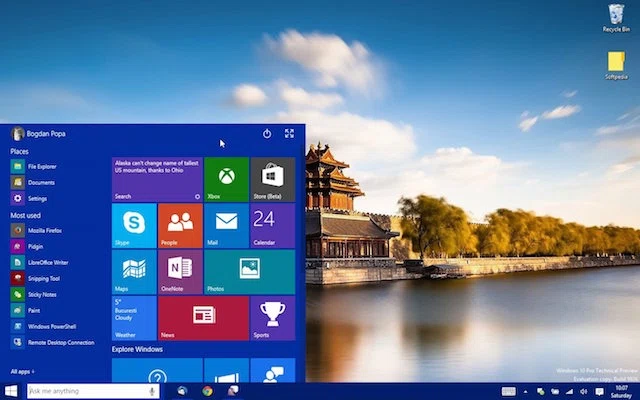
Windows 10 doesn’t just bring the Windows experience back to its roots, but it also improves on a lot of the basic functionality of older Windows operating systems like Windows 7. For one, you’ll get a new and improved start menu that allows you to manage commonly used apps and see live metro tiles. You’ll also get access to multiple virtual desktops, as well as built-in support to automatically resize all your windows when working with two or more resources.
Other improvements include a smaller footprint (the Windows 10 operating system is 2 GB lighter than its predecessor), a revamped Action Center that gathers notifications and messages from both your computer as well as your mobile devices. According to various reviews and impressions from tech writers who have reviewed the beta, Windows 10 seems to have an all-around faster core functionality than Apple’s OS X, guaranteeing a smooth user experience from the get-go.