At Dealspotr, our mission is to solve two major problems related to finding deals and coupons online:
- Expired coupon codes
- Email newsletter overload
Let’s face it, the only way to stay in the know about coupons from your favorite brands is to subscribe to their email newsletters. This worked well for our first few weeks on the internet, as we subscribed to our first few email lists. But quickly, we find our inbox overflowing with emails from retailers (aka spam), and we’re left to our own devices, clicking unsubscribe one-by-one, praying that the stores don’t ask us to remember our login password (who does these days?).
Well the good news is, we have an answer. With Dealspotr, we’ve built a community-driven engine where 70,000 deal enthusiasts find, share, and edit the best deals from virtually every store imaginable. What this means for the average deal hunter is that if there’s a deal out there, Dealspotr has it. In fact, we just completed a study that revealed that we now have greater coverage of working coupon codes across retailers than any other coupon site online, including industry giants like RetailMeNot and Coupons.com.
So if there’s a deal for, say Jet.com, we have it. Now, with our new email notifications system, you can get notified about any deal for any of our 60,000 retailers. Here’s how it works.
If you’re interested in deals from Jet, just head over to the Jet.com page on Dealspotr, and look for the “Subscribe” button with the funny icon (that icon represents Your Feed on Dealspotr). Click it, and you’ll be subscribed to Jet.com’s deals, but you’ll only see them posted on your Feed when you visit it. If you also want to get email notifications for new deals from Jet, then just toggle the email notifications to “on” and you’re all set.
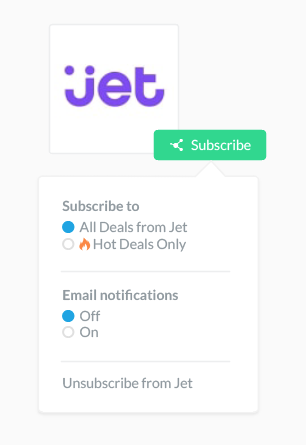
You can always turn emails off by visiting your Feed page and clicking on the down arrow next to any Jet.com update.
You can also choose between receiving all deals from Jet, or only Hot / On Fire deals. The default is Hot / On Fire deals only.
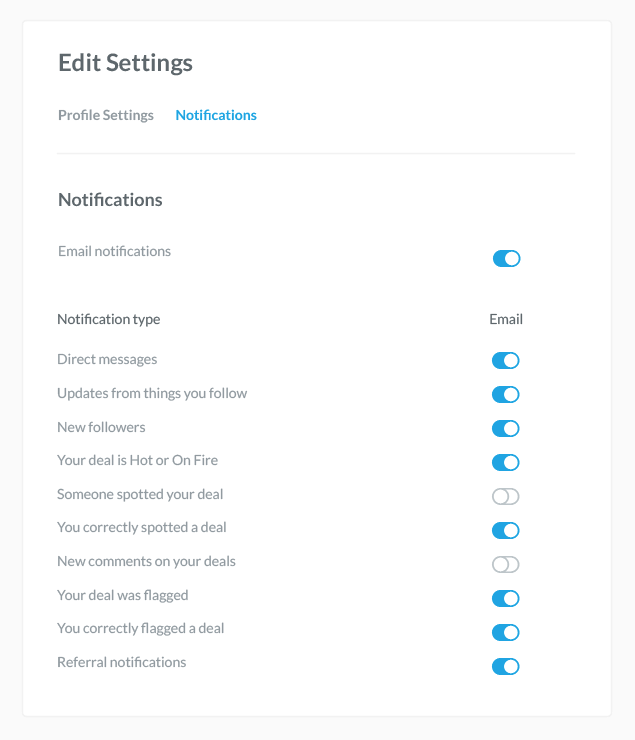
We’ve also launched Notification settings, when you can find by visiting your settings page, then clicking on the Notifications tab. Here you can turn on or off specific types of email notifications you receive from Dealspotr. Say for example, you wanted to turn off notifications for new spots on your deals, as well as comments on your deals, you’d set it up like this:

We hope you enjoy these new features. If you’d like to give us feedback on this feature, or any other features on Dealspotr, we invite you to join our Product Panel group on Facebook. This is a private group where our users can preview upcoming features and provide feedback and suggestions into our development roadmap. We look forward to seeing you there!